
- One or more documents
- One or more counterparties
- A list of sub-suppliers or linked entities
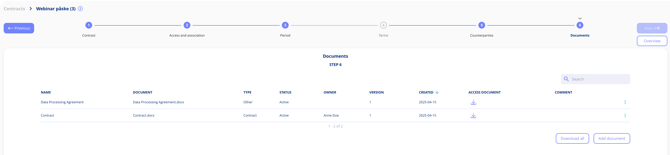
Uploading Documents
- The main agreement (e.g. PDF of signed contract)
- Appendices or DPAs
- Supporting documentation
Each document can be named, categorised (e.g. “Main contract”, “Appendix”), assigned an owner and given a status (e.g. active, draft).
Counterparties and Sub-suppliers
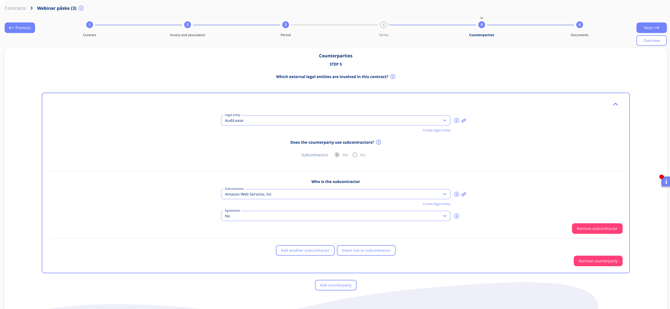
- Add one or more counterparties
- Specify if they are vendors or data processors
- Add known sub-processors (e.g. AWS for a software vendor)
Structure your contract content — and the parties involved
Document Status
Each document carries a status, so it is clear at a glance which version people are looking at. Signed is available as a status for documents on both contracts and legal entities — useful for separating an executed agreement from the drafts that came before it.
Internal and External Contract Parties
Internal and external parties used to appear together in a single list on the contract parties step, which made them hard to tell apart. They are now two separate lists — one asking which internal legal entities are involved in the contract, and one asking which external legal entities are — each with its own button for adding a party.
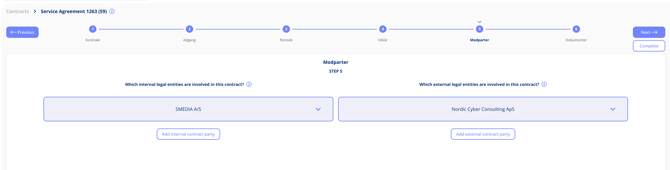
Nothing you have already registered changes. The same parties are shown in the list they belong to, so it is clear at a glance which side of the agreement each one sits on.