
What is advanced document search?
Advanced document search lets you locate documents across the platform using filters such as area, entity name, responsible party, document status, and document type. You can preview, download, or export results directly from the search interface.
How do I access advanced document search?
1. Click the Global search bar at the top of the platform.
2. Select the Documents tab.
3. Use the Advanced search option to access the full filtering interface.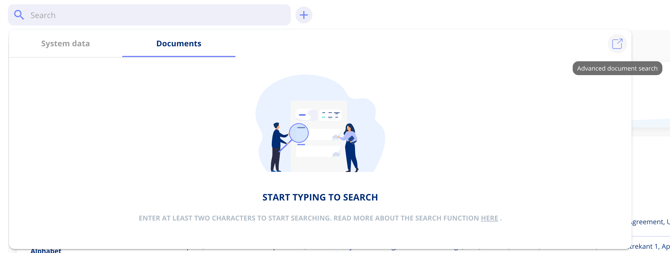
What filters are available in advanced document search?
The advanced search interface lets you narrow results by:
- Area — Contract, policy, processing activity, asset, etc.
- Entity name — The specific record the document belongs to.
- Responsible party — The person responsible for the entity.
- Document status — Active, draft, or archived.
- Document type — Appendix, data processor agreement, etc.
- Contract parties — Filter by associated parties.
What information appears in the search results?
Results display comprehensive information for each match: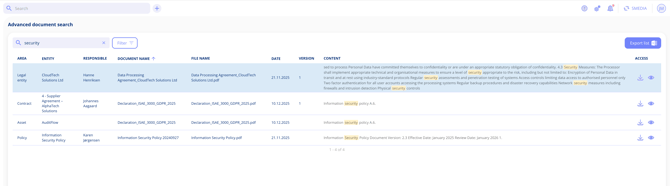
- Area — Where the document is stored
- Entity name — The parent record
- Responsible party — Who manages it
- Document name — The file name
- Creation date — When it was uploaded
- Version number — Which version matched
- Content preview — A snippet showing where the search term appears
From the results, you can preview or download any document directly.
How do I export search results?
1. Run your search with the desired filters.
2. Click the Export button.
3. The platform sends you an email with the exported data within a few minutes.
This is useful for audit preparation, data reviews, or compliance documentation.
Related Articles
- Document Search and OCR
- Preview Documents in the Platform