
Access Settings
Contract access settings let you control who can view each contract and which internal entity it belongs to. You can restrict visibility to the owner, open it to all users, or share it with specific people or departments.
There are three visibility options available:
- Owner only (default): Only the contract owner can see the contract.
- All users: The contract is visible to everyone in your organisation.
- Specific users or departments: Grant access to selected individuals or teams.
To change the access setting on a contract:
- Open the contract.
- Go to the Details panel.
- Locate the Access field under Access Settings.
- Select the visibility option that applies: Owner only, All users, or Specific users or departments.
- If you selected Specific users or departments, choose the relevant individuals or teams from the field that appears.
- Save your changes.
Internal Entity Assignment
If your organization operates across multiple legal entities or companies, you can assign each contract to the correct internal entity. To assign an internal entity:
- Open the contract.
- Go to the Details panel.
- Select the relevant entity from the Internal Entity field.
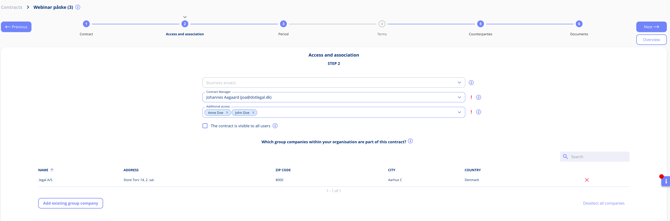
The image above shows the Access Settings and Internal Entity options as they appear in the contract Details panel.