How to Edit Obligations Inline
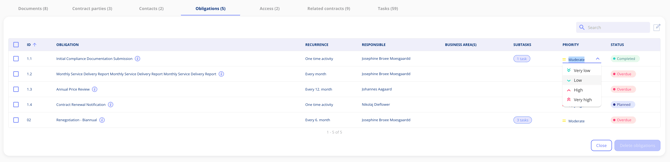
To edit obligations inline, open a contract, go to the Obligations tab, and click the edit icon. You can then update the responsible person and priority level directly — changes save automatically.
- Open the contract containing the obligations you want to update.
- Navigate to the Obligations tab.
- Click the edit icon in the top-right corner of the obligations tab.
- The obligations overview becomes editable. You can now update the following fields:
-
- Responsible Person — reassign the obligation to another user
- Priority — adjust the obligation's priority level
- Due Date — update when the obligation must be completed
- Status — change the current fulfillment status of the obligation
Changes save automatically — no additional save step is required.