
How do I register an auditor's report without sending a notification?
You can register an auditor's report manually — either when excluding a supplier from an audit round, or directly on the supplier record — without sending any email to the supplier. Use either method below when a supplier has already submitted a report through other means, or when you want to record an existing declaration internally.
Option 1: How do I upload a report when excluding a supplier from an audit round?
- In an audit round, choose to exclude the supplier.
- Select Auditor's report as the reason for exclusion.
- A document upload field appears — upload the report directly.
- Save.
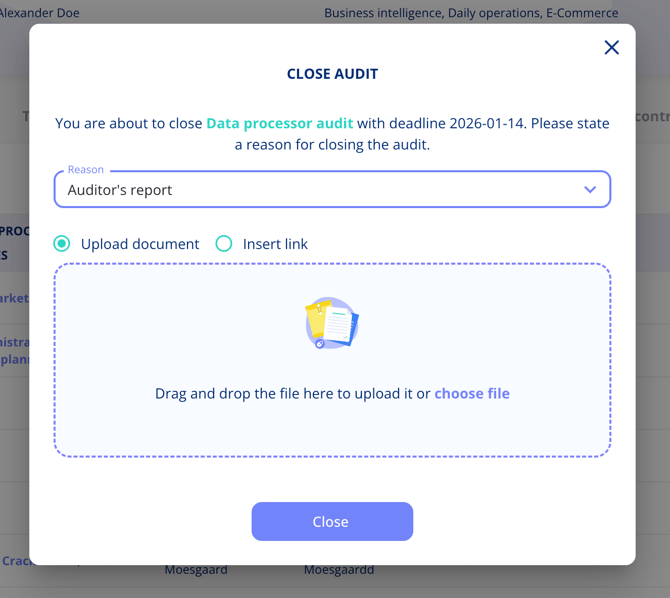
The supplier's audit status updates to reflect that a report is in place, and the document appears under the supplier's documents.
Option 2: How do I register a report directly on the supplier record?
- Open the supplier (legal entity).
- Navigate to the Audit tab.
- Select Register auditor's report.
- Assign a responsible person.
- Upload the document or insert a link to it.
- Save.
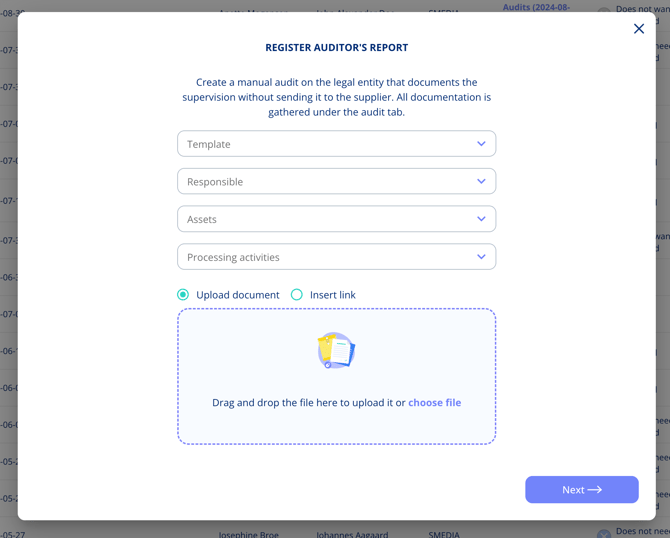
No email is sent to the supplier. The status updates to show that a report has been registered, and the document is available to view or download from the overview.
Note: If you later delete the registered report, the associated document is removed automatically.