
Third Country Settings let you document GDPR compliance for international data transfers when a vendor or sub-processor is located outside the EU/EEA. Use these settings to record the transfer basis, flag entities requiring a Transfer Impact Assessment, and automatically apply protection mechanisms across all related transfers.
Accessing third country settings
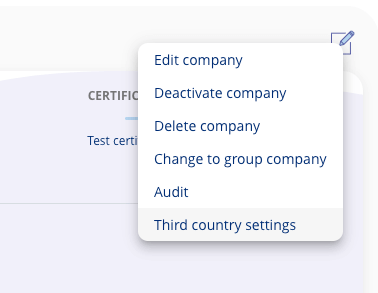
- Navigate to the legal entity you want to configure.
- Click the edit icon.
- Select Third country settings.
Configuration options
Transfer Impact Assessment (TIA)
Mark whether a Transfer Impact Assessment is necessary for this legal entity. This flags the entity for additional review and documentation.
Transfer Basis Requirements
Specify whether a transfer basis is required and select the appropriate protection level. Options include:
- SCC — GDPR Article 46(2)(c) — Standard Contractual Clauses
- Other applicable transfer mechanisms under GDPR
Automatic application
When you set a specific transfer basis on a legal entity, it is automatically applied to all existing transfers where that entity acts as a data processor or sub-processor. This saves you from updating each transfer individually.
Custom overviews
If you have the Custom Lists add-on, you can generate reports showing all legal entities and their associated transfer bases. This provides a comprehensive compliance overview for audits and reporting.