
Only platform administrators can activate plans and add-ons on the .legal platform. If you do not have administrator access, contact your organization's platform administrator to request plan or add-on changes.
To activate a plan or add-on on the .legal platform, go to your profile icon, select See your plan, choose the module or add-on you want, and complete the purchase. This guide walks you through each step in detail.
How to Activate a Plan or Add-On: Step-by-Step Guide
1. Access your plan settings
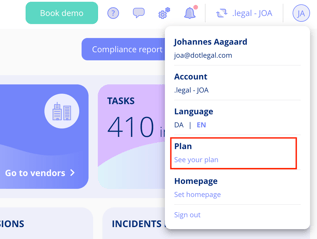
Go to your profile icon in the top-right corner and select See your plan.
2. Review available modules
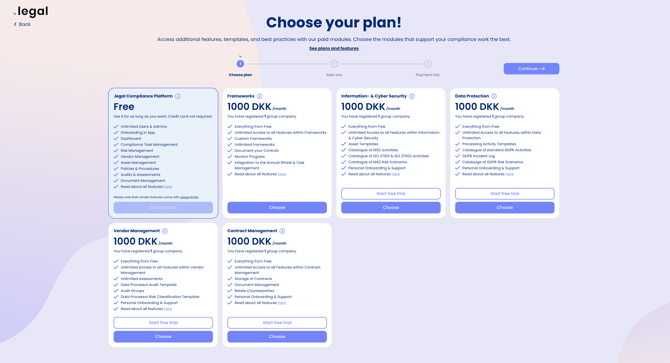
You'll see an overview of all platform modules on the Modules tab — showing which ones you already have access to and which are available to purchase. To activate a module, click Choose next to it. To activate an add-on instead, proceed to step 3.
3. Navigate to add-ons
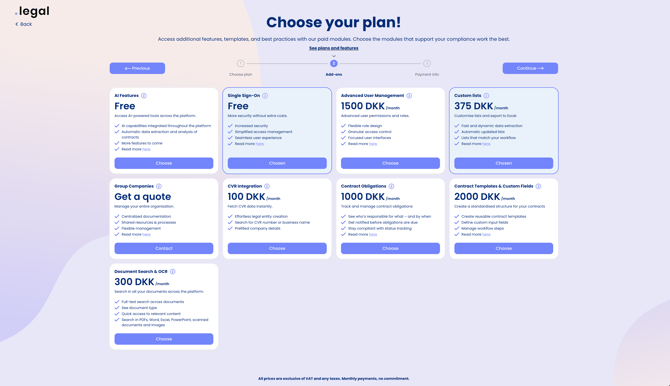
Select the Add-ons tab to view all available add-ons.
4. Choose your module or add-on
Click Choose next to the module or add-on you want to activate.
5. Complete your purchase
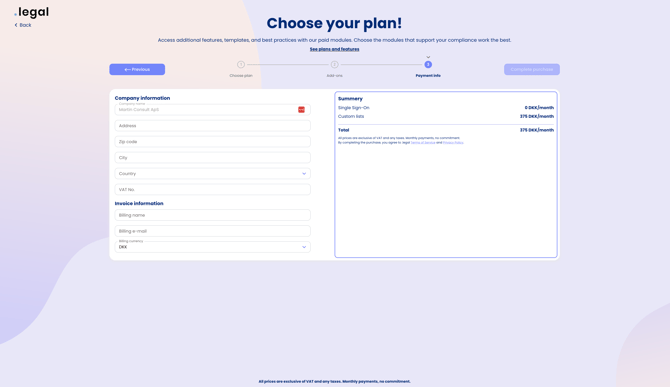
Enter your company and billing information — including company name, billing address, and payment details — then click Complete to finish. Your new plan or add-on is activated immediately and ready to use. If an error occurs during checkout, verify that your billing details are correct and try again, or contact the .legal support team for assistance.
You will receive a confirmation email once the purchase is complete. If you do not receive it, check your spam folder or contact the .legal support team.
Additional step for SSO activation
If you are activating the SSO add-on, first complete steps 1–5 above, then complete an additional security approval step in Microsoft Entra ID. Note: Your SSO integration will not function until this approval is completed. Learn how to complete the SSO security approval.