
An audit is sent to one contact person at a legal entity, the person named in the emails. You can now add more of the entity's contacts as additional recipients. They work much like CC on an email: they receive the same notifications as the contact person. This is useful when you bring several audits together in one and different people are responsible for different areas.
Add recipients in an audit group
- Go to Audits & Assessments > External audits and create or open an audit group.
- Select the legal entities. Each one shows its contact person in the Contact column.
- In the Additional recipients column next to it, pick more of the entity's contacts from the dropdown.
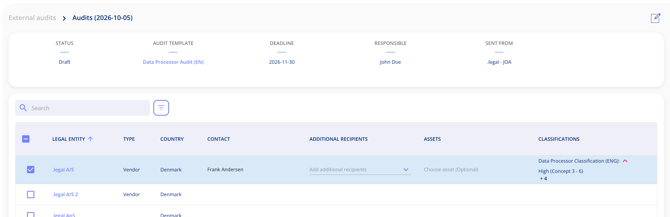
The contacts you can choose from are the ones created under the Contacts tab on the legal entity.
Add recipients to an audit that has already been sent
You can also add additional recipients to an audit that has already been sent, directly from the legal entity.