
When a contract passes its end date, it renews for the chosen period without any manual action — and any obligations tied to the contract's end date are updated automatically.
Enable Auto-Renewal on a Contract Template
- Go to Settings > Contract templates.
- Open the contract template you want to configure.
- Find the end date field and enable the auto-renewal option.
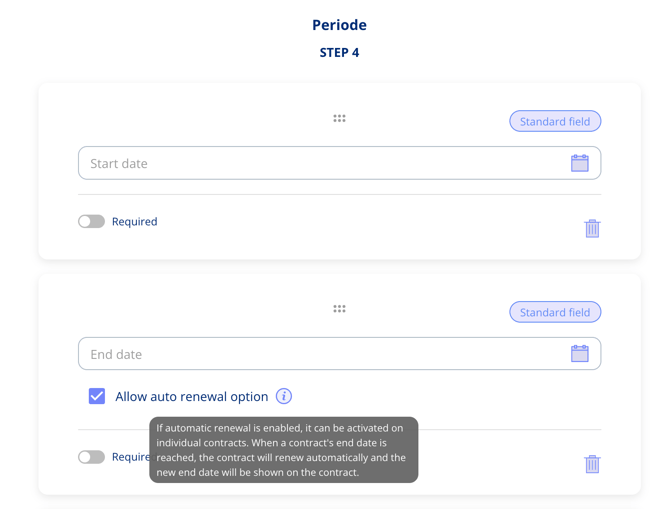
Note: The auto-renewal option is automatically added to the standard contract template.
Set the Renewal Period on a Contract
Once auto-renewal is enabled on the template, a renewal period field appears on the contract itself when you select an end date.
- Open the contract.
- Set an end date.
- Enter the renewal period — for example, 12 months.
- Save the contract.
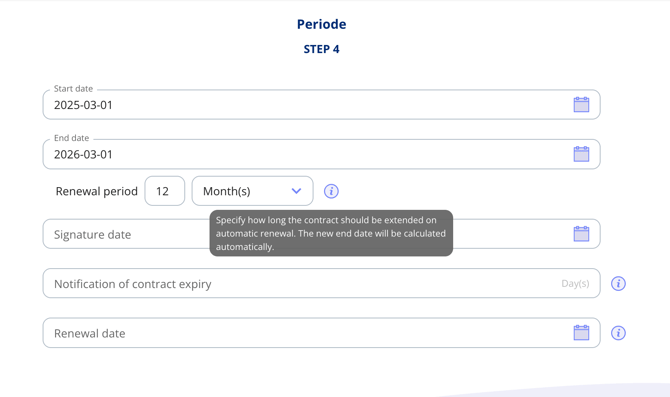
When the contract passes its end date, it renews automatically for the specified period. Renewal only applies to active contracts — archived contracts are not affected.
What Happens to Obligations on Renewal
Any obligations tied to the contract's end date are updated automatically when the contract renews, so your tasks and deadlines stay in sync without any manual adjustments.