
This ensures that sensitive contract information is only accessible to authorised team members.
How It Works
When setting an access-controlling business area on a contract, users can only select business areas they have permission to access. This prevents accidentally granting access to users outside their permission scope.
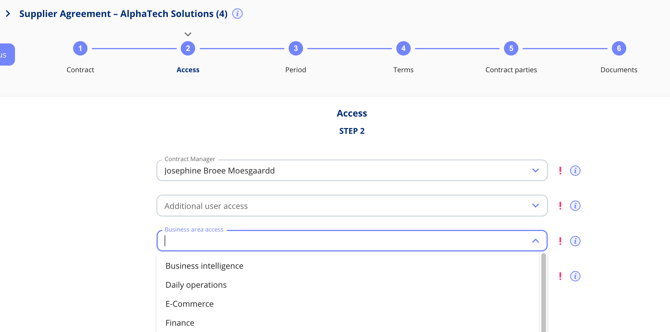
Note: This restriction applies only to access-controlling business areas on contracts. Standard business area selections elsewhere in the platform remain unrestricted.
Bulk-Transfer Business Area Access
When your organisation restructures departments or consolidates business areas, you can transfer business area access across multiple contracts at once.
- Go to Settings > Administrative Functions.
- Select the source business area (the one being transferred from).
- Select the target business area (the one receiving access).
- The system updates all affected contracts automatically.
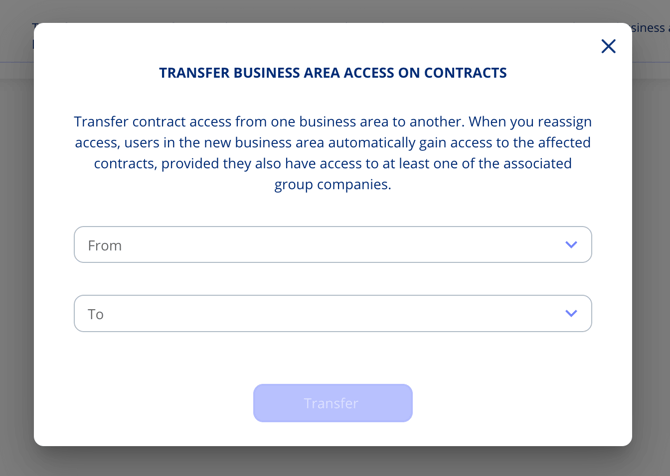
Users in the new business area gain access to the transferred contracts, provided they also have access to the associated group companies.
Use Cases
- Organisational restructuring — Move contract access from one department to another in bulk.
- Department consolidation — Merge business areas without losing contract access.
- Access audits — Ensure that only the right teams have access to sensitive contracts.