
Find Obligations with AI automatically scans a contract document and suggests obligations based on the clauses it detects. Instead of reading the agreement and manually entering each obligation, you can let AI do the work for you. No obligations are created until you have reviewed and accepted the suggestions.
Before you start
- The Contract Obligations and AI Features add-ons must both be enabled.
- The contract must have at least one document attached.
- You must have the appropriate user permissions to use AI features. Contact your administrator if the option is not visible.
Start the search
- Open the contract and open one of its documents.
- Select Find obligations with AI at the top of the document viewer.
- Wait while the document is read through. The panel then tells you how many obligations were found. If no obligations are found, a message will indicate this.
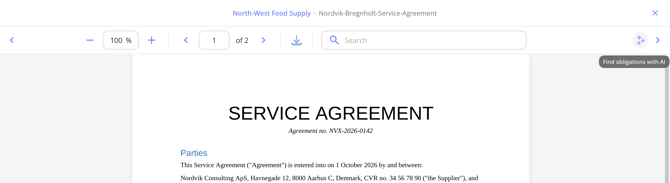
The same search can be started from the Obligations tab on the contract. There you pick which of the contract's documents to run it through, without opening the document first.
Review the suggestions
Suggestions are presented one at a time next to the document, with the clause they came from highlighted in the text. For each suggestion, you can adjust any obligation field — including the title, description, recurrence, start date, and responsible person — before accepting it.
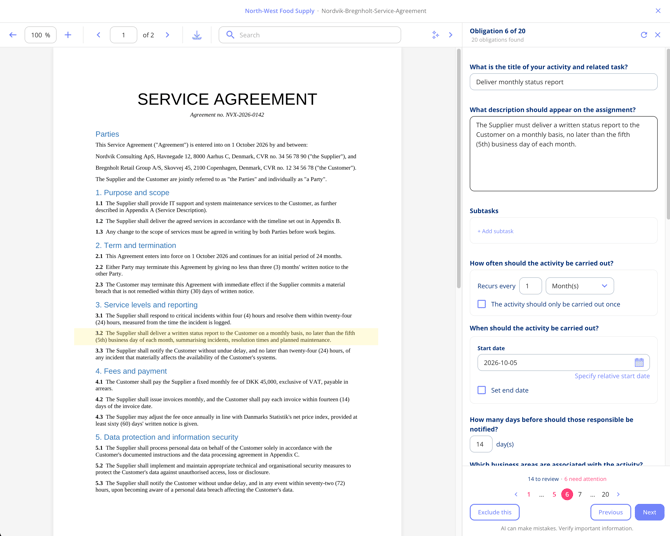
- Use Next and Previous, or the numbered indicators below the panel, to move between suggestions. The counter shows how many suggestions are left to review and how many are flagged as needing attention (for example, potential duplicates).
- Select Exclude this for a suggestion you do not want. It is left out and nothing is created from it.
- Where a start date can be worked out from the wording, it is filled in for you.
Important notes
- You always set the responsible person yourself — the AI does not assign one.
- If a suggestion looks like a duplicate of an obligation already on the contract, it is flagged and excluded by default. You can still choose to create it.
- Check every suggestion against the clause it came from before creating it. AI can make mistakes. In particular, verify obligation titles, dates, and recurrence settings, as these are the fields most likely to require correction.
- Obligations created this way behave like any other obligation: each one gets a task in Task Management, and recurring ones get a task per occurrence.
Once you have reviewed all suggestions, select Create obligations to save the accepted ones to the contract. Excluded suggestions are discarded and cannot be recovered.