
An obligation is easier to act on, and to defend in an audit, when it is clear which part of the agreement it comes from. Each obligation can therefore carry its source in the contract: the document, the section and the clause text itself.
Add the source to an obligation
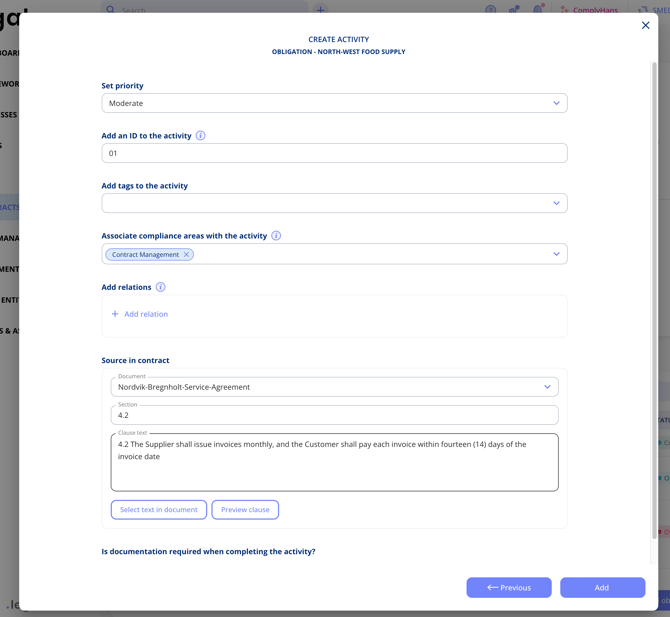
The fields sit under Source in contract in the obligation, below the compliance areas and relations.
- Choose the Document the obligation relates to. A contract can have several documents attached, so this comes first.
- Enter the Section, for example 4.2.
- Enter the Clause text.
Take the clause straight from the document
Rather than retyping the wording, pull it out of the document:
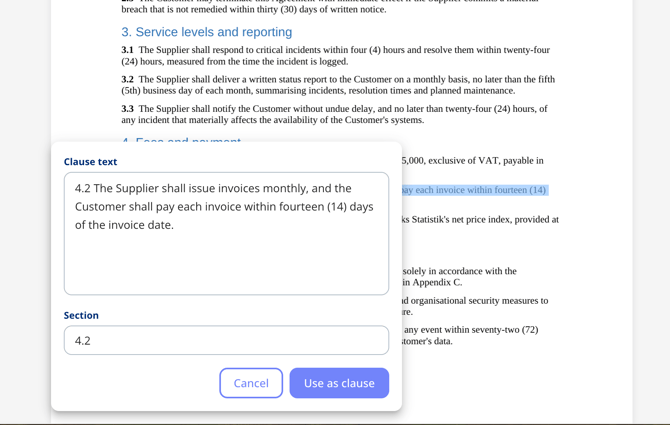
- Select Select text in document. The document opens.
- Mark the relevant passage.
- The clause text and a suggested section number are filled in for you. Correct either one if needed.
- Select Use as clause.
Check the clause before you save
Select Preview clause to open the document again with your selected text highlighted. That is the quickest way to confirm you captured the right passage, particularly where the same wording appears more than once in an agreement.
Important notes
- This requires the Contract Obligations add-on.
- The source is stored per obligation, so two obligations from the same document can point at different sections.
- Obligations suggested by AI arrive with the clause they came from already highlighted in the document.