
Step 1: Check that you are Account Administrator
When you log in to PACTIUS, you get to the system's front page "My Contracts". To set up the system you must be set up with "Account Administrator" access (this will be the case if you are the first user of the solution).
If you are an "Account Administrator", you can access the menu option "Settings".
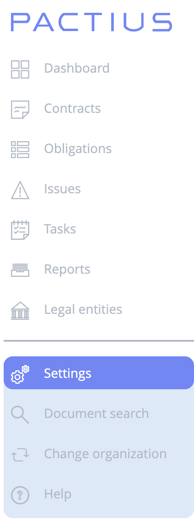
If you cannot see the Settings option, you do not have Account Administrator access. Contact your Account Administrator to request the necessary permissions or to have your role updated.
Step 2: Create Business Units
At least one "Business Unit" must be created before the first contract can be created.
Note: Business units control which users can access which contracts. You can name them after departments, subsidiaries, legal entities, or any other organisational grouping that reflects how your business manages contract access.
You can always change the name afterwards, but you cannot delete a business unit once it has been created.
The creation of business units takes place in the following way:
- Go to "Settings" in the menu to the left and select "Business Units".
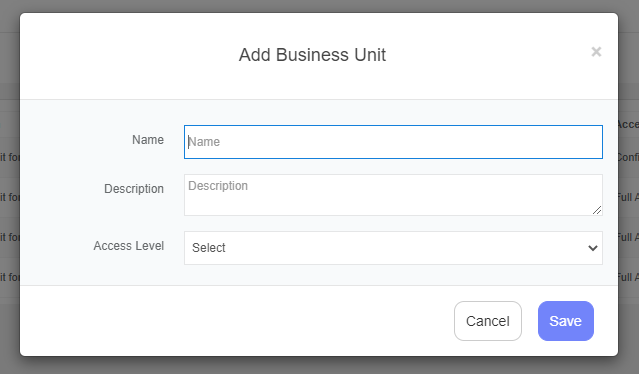
- Press "Add" in the upper right corner to add a business unit.
- Enter the name of the new business unit and click "Save".
Step 3: Create Contract Types
At least one contract type must be created before the first contract can be created.
Note: Contract types help you categorise and distinguish contracts in PACTIUS. Common examples include purchase agreements, sales agreements, non-disclosure agreements (NDAs), service agreements, and partnership agreements.
You can always change the name afterwards, but you cannot delete a contract type once it has been created.
The creation of contract types takes place in the following way:
- Go to "Settings" in the left menu and select "Contract Types".
- Click "Add" in the upper right corner to add a contract type.
- Enter the name of the new contract type and click "Save".

You have completed the initial setup of PACTIUS. You are now ready to create your first contract — navigate to **My Contracts** in the left menu and click **Add** to get started.