
How to link assets
To link assets in dotLegal, open the edit flow for the asset, click Associated Assets, and select one or more assets to link. This creates a bidirectional relationship visible on both assets.
- Open the edit flow for the asset
- Click Associated Assets
- Select one or more assets to link
- Click Save to confirm the association
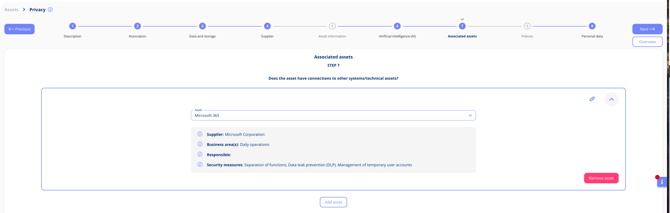
This creates a bidirectional link — both assets will show the relationship.
Why link assets?
Linking assets helps you visualise dependencies, improve risk tracing, and enhance documentation of technical flows across your systems.
- Visualise dependencies (e.g. frontend › API › database)
- Improve risk tracing
- Enhance documentation of technical flows