
What information can you add to a task?
You can add the following fields to a task. Tasks can be created as ad hoc tasks or generated from the annual wheel, and the editing rules differ between the two — see below for details.
- Task name
- Description
- Responsible person
- Business area
- Deadline (by month)
- Tags
- Approver
- Documentation requirementEach field is optional except for **Task name**, which is required to save the task.
.png?width=670&height=531&name=task-overview%20(1).png)
What is the difference between ad hoc tasks and annual wheel tasks?
An ad hoc task is created directly in Task Management and is not tied to the annual wheel. Use ad hoc tasks for unplanned work such as a follow-up action, an operational routine, a one-off compliance task, or anything specific to your team.
On the task board the two are easy to tell apart. Tasks that came from the annual wheel carry a dedicated icon, which links straight to the activity behind them, and a filter lets you show one type or the other.
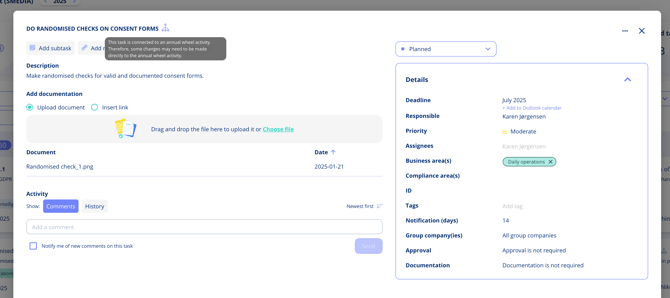
Note: On an ad hoc task, you can edit every field directly. On an annual wheel task, you must make most changes on the related activity rather than on the task itself.