
How do you create a risk assessment?
To create a risk assessment, open the relevant entity in your risk area, add a risk scenario, and set the consequence and probability levels with justifications. The risk level is then calculated automatically from the matrix belonging to that risk area.
Risks that concern the organisation as a whole rather than one entity are assessed the same way, directly on the risk area. See Assess risks at organisational level.
- Go to your risk area and select the Operational overview.
- Find the entity you want to risk assess.
- Open the entity and click Add risk scenario.
- Select the risk scenario you want to assess against.
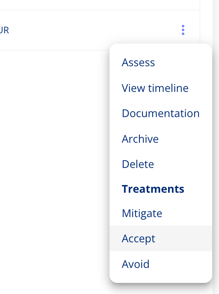
- Once the risk scenario is added to the entity, select the three dots to the right of the scenario and select Assess.
- Set the consequence level and select the specific consequences that apply.
- Write a justification for the consequence level.
- Set the probability level and select any security measures already in place. Security measures are controls or safeguards previously configured in your risk area settings. If none appear, none have been defined for this area yet — add them in the risk area settings first, or leave the selection empty and continue.
- Write a justification for the probability level.
- Optionally add the risk exposure, meaning the estimated financial loss if the risk materialises.
- Click Save.
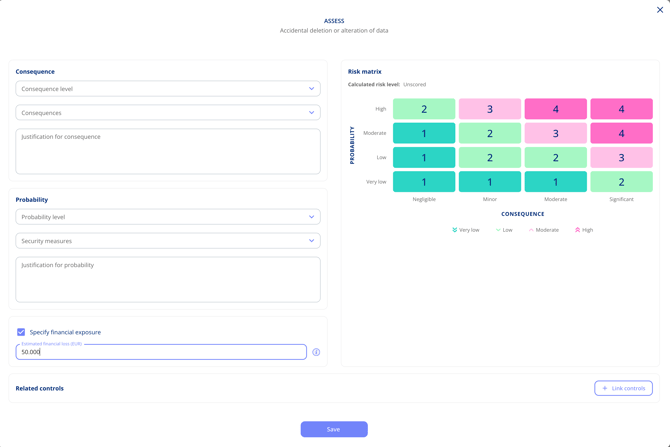
The risk level is calculated and shown on the assessment. If it sits above the area's risk appetite, it is flagged as exceeding the risk appetite, indicating that action may be required.
Please note:
Why do consequence and probability require a justification?
Consequence and probability always require a justification because it creates an audit trail you can point to when someone later asks why a risk was rated the way it was.