
This is particularly useful when a team member changes role, goes on leave, or leaves the organisation — you can quickly see all their assignments and transfer them to another person.
Viewing a User's Responsibilities
- Go to Settings > User Management.
- Click on the user you want to review.
- A table displays all areas where the user holds responsibility, along with a count of appearances in each category.
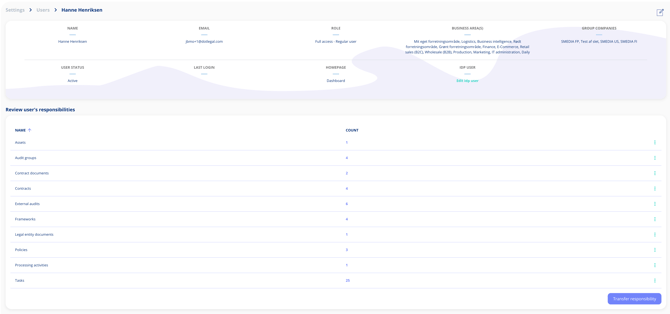
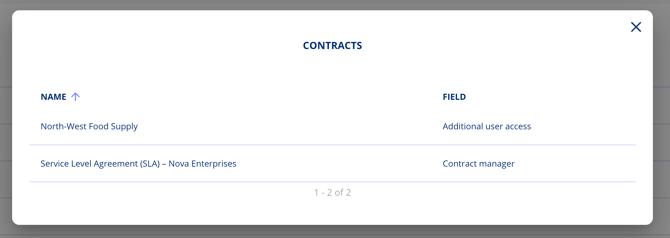
Click on any row to see the details — specific contracts, obligations, processing activities, and assigned roles.
Transferring Responsibilities
If you need to reassign a user's responsibilities to another person, you can do so directly from this overview.
Note: This feature is available on paid plans with the Advanced User Management add-on.
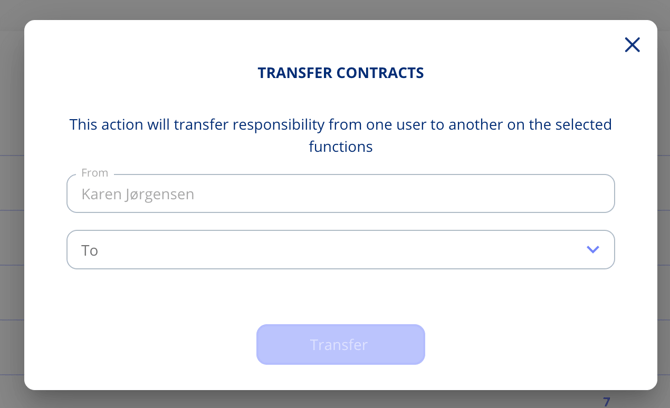
- From the user's responsibility overview, click Transfer.
- Choose whether to transfer all responsibilities at once or individually per entity.
- Select the target user who should receive the responsibilities.
- Confirm the transfer.
Transferred responsibilities include contracts, obligations, tasks, and any other platform assignments linked to the original user.
Use Cases
- Offboarding — Ensure no responsibilities are left unassigned when someone leaves.
- Role changes — Quickly hand over all compliance duties to a successor.
- Leave coverage — Temporarily reassign responsibilities during extended absence.
- Compliance audits — Review who is responsible for what across the organisation.