
Prerequisites
The AI Features add-on must be activated. See Introduction to AI Features (for setup instructions.
You need permission to create contracts.
How to Create a Contract with AI
1. Navigate to Contracts and click Create contract.
2. Select AI-assisted creation.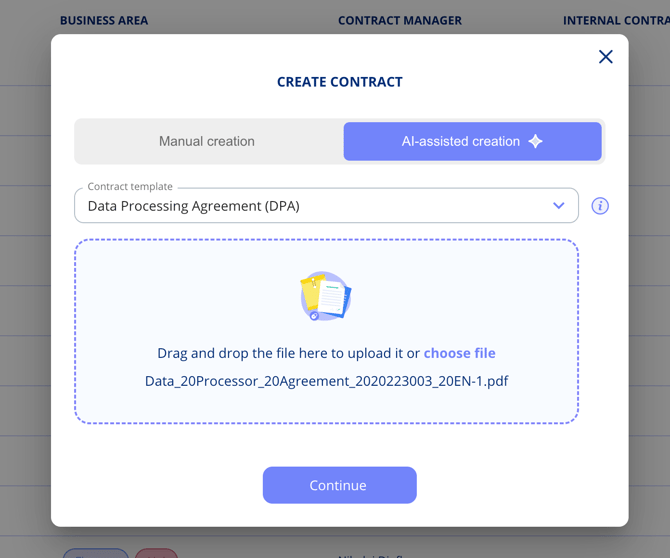
3. Choose the appropriate contract template.
4. Upload the contract document (PDF or Word).
5. The AI processes the document and extracts relevant information. This may take a few moments.
Reviewing AI Results
After processing is complete, dotLegal displays all extracted data for your review. Check each field carefully before proceeding: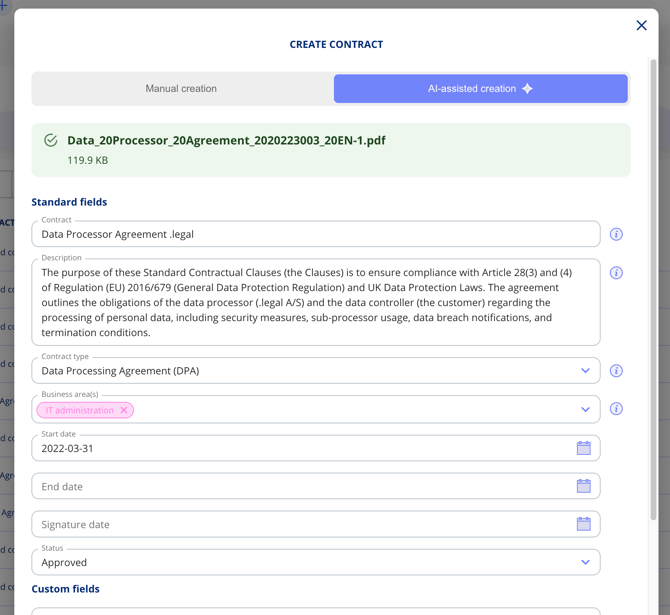
Standard fields automatically populated:
- Contract name and description
- Contract type
- Business areas
- Start and end dates
- Currency and amounts
- Payment terms
- Contract parties (with addresses and registration numbers)
Custom fields
The AI uses field descriptions from your contract template as context for extraction. The more descriptive your field labels are, the better the AI performs.
Contract parties
The AI automatically matches extracted parties against existing records in the platform using registration numbers or company names. You can adjust matches or add new parties before finalising.
Video Walkthrough
Watch the full AI-assisted contract creation workflow in this short walkthrough (approx. 50 seconds):
Important Notes
- AI results are a starting point — always review and verify extracted data before saving.
- Fields the AI cannot confidently extract are left empty for you to complete manually.
- Your data is processed by a European AI provider in accordance with GDPR and is never used to train AI models.
Related Articles
- Introduction to AI Features
- AI Quality Scan
- Create a Contract