
How do I register an incident?
Go to the incident log, select Create incident and choose the template that matches what happened, for example Personal data breach or NIS2 incident. You are then taken through the incident one step at a time, with only the fields that matter for that kind of incident. See Standard Incident Templates and Your Plan.
Steps to register an incident
- Go to Incidents.
- Select Create incident.
- Choose the incident template.
- Work through the steps. For an information security incident they are Incident, Access, Timeline, Services and impact, Notification, Relations and Documentation. Use Next and Previous to move between them.
- Select Complete when you are ready.
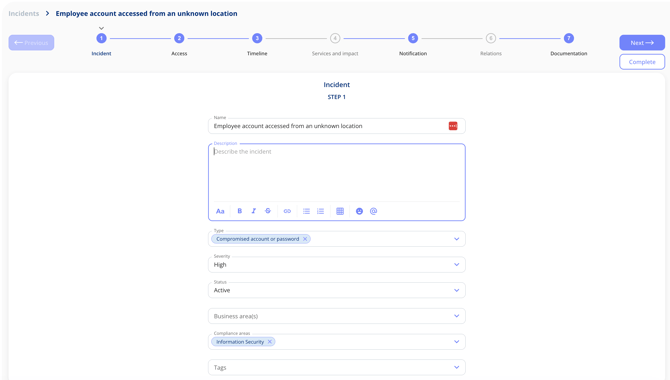
Some fields must be filled in before the incident can be created, so the essentials are always captured from the start. Which fields these are is decided by the template.
If the incident was first reported as an observation, you do not need to type it in again. See Convert an Observation to an Incident.
Why does incident documentation matter?
Well-documented incidents support your compliance with GDPR Articles 33 and 34, fulfil NIS2 notification obligations, and build an internal record that strengthens your organisation's ongoing compliance work and preparedness.