
Observations are what people report through the observation link or register directly. Some of them turn out to be incidents, for example an employee who entered their password on a phishing page. Those can be converted straight into an incident.
How to convert an observation
- Go to Observations.
- Find the observation and open the menu (the three dots) at the end of its row.
- Select Convert to incident.
- Choose the incident template that fits what happened.
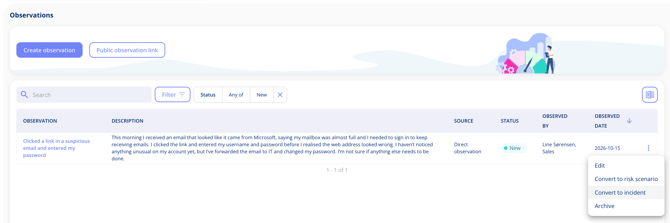
An incident and a risk from the same observation
The same observation can still become a risk scenario too, with Convert to risk scenario. That way you can handle the incident now and follow up on the underlying risk later. See Review an observation.