
When you create an incident, you start by choosing a template. The template decides which steps and fields the incident has, so you are only asked for what matters for that kind of incident.
The five standard templates
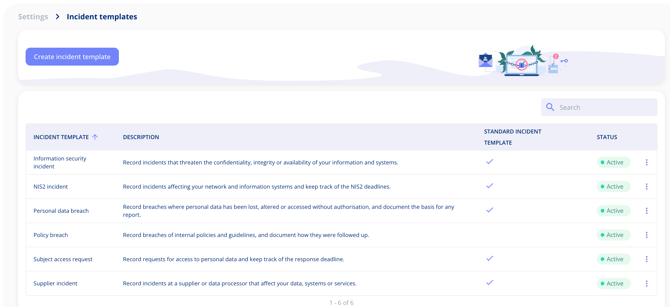
- Personal data breach: breaches where personal data has been lost, altered or accessed without authorisation, including the basis for any report to the supervisory authority.
- Subject access request: requests from individuals for access to their personal data, with the response deadline.
- NIS2 incident: incidents affecting your network and information systems, with the NIS2 deadlines.
- Information security incident: incidents that threaten the confidentiality, integrity or availability of your information and systems.
- Supplier incident: incidents at a supplier or data processor that affect your data, systems or services.
You find the templates under Settings > Incident templates. Standard templates are marked with a check mark in the Standard incident template column.
Which templates are included in your plan
The incident log is not tied to a single plan. Each standard template belongs to the plan it is most relevant to:
- Personal data breach: Data Protection
- Subject access request: Data Protection
- NIS2 incident: Information and Cyber Security
- Information security incident: Information and Cyber Security
- Supplier incident: Vendor Management and Information and Cyber Security
Templates that are not part of your plan are shown with a padlock, so you can see what an upgrade would give you.
When the standard templates are not enough
With the Templates and Custom Fields add-on you can build your own templates, from scratch or based on a standard one. See Create Your Own Incident Template.