
If there are parts of the platform your organisation does not use, you can hide them from the main menu. The change applies to every user in your organisation as soon as you save.
How to hide menu items
- Go to Settings and open Menu items.
- Untick the menu items and sub-items you do not want to show.
- Check the preview on the right, which shows how the menu will look.
- Select Save.
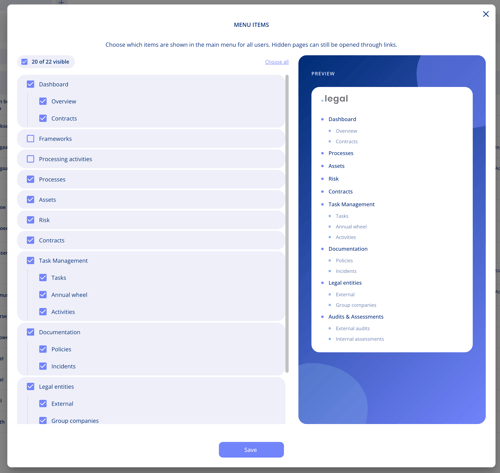
The counter at the top shows how many items are visible, and Choose all shows every item again.
Important notes
- If you hide every sub-item under a menu item, the menu item itself disappears too.
- Hidden pages are not removed. They can still be opened through links.
- To manage menu items you need permission to edit master data, so it is usually set up by an administrator.
- A common use: an organisation that documents everything as processes can hide Processing activities, or the other way round. See Processes: Document Business Processes Beyond GDPR.