
Processes is an item in the main menu for documenting business processes that go beyond GDPR: processes related to NIS2 or DORA, or everyday processes such as employee onboarding or supplier onboarding.
Which plans include Processes?
- Processes is included in every paid plan.
- On the free plan you can create up to five processes.
- Your own process templates require the Templates and Custom Fields add-on.
- Risk assessments on processes require the Enterprise Risk Management add-on.
Processes or processing activities?
Processing activities are built around GDPR, and your transfers and Article 30 record are tied to them. They remain the place for personal data. Processes cover everything else, with templates you can tailor to your needs.
The two work together: when a process involves personal data, link the relevant processing activities to it in the process's Processing activities step, so the full picture is in one place. If your organisation only needs one of the two, you can hide the other from the main menu. See Hide Menu Items You Don't Use.
The process list
Go to Processes to see every process. The list shows the ID, process, template, business areas, responsible person and status, so you can quickly see which processes are active and which are still drafts.
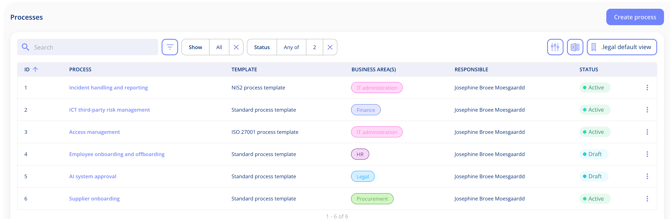
- Search and the filter button narrow the list, for example by status.
- The column icon lets you choose which columns are shown.
- Save your filters and columns as a view, or return to the .legal default view.
- The Excel icon exports the list.
To add a process, select Create process. See Create a Process.
Processes and risk
With Enterprise Risk Management you can run risk assessments on a process, just as on an asset or a legal entity. The process's risk level for each risk area is shown on its overview. Processes also appear in the relationship graph, so you can see how they connect to the assets, legal entities and processing activities behind them. See Risk assess an entity.