
How to Change the Frequency of the Weekly Task Notification Email
To change the send frequency of the Weekly Task Notification email, go to Settings > Email Configuration and follow the steps below.
Note: Admin-level permissions are required to access Email Configuration. If you do not see this option, contact your system administrator.
Go to Settings and select Email Configuration.
height="99" style="height: auto; max-width: 100%; width: 670px;" src="https://help.dotlegal.com/hs-fs/hubfs/Knowledge%20center/Articles/Settings/email/Sk%C3%A6rmbillede%202026-04-13%20kl.%2008.27.29.png?width=670&height=99&name=Sk%C3%A6rmbillede%202026-04-13%20kl.%2008.27.29.png" width="670" loading="lazy" srcset="https://help.dotlegal.com/hs-fs/hubfs/Knowledge%20center/Articles/Settings/email/Sk%C3%A6rmbillede%202026-04-13%20kl.%2008.27.29.png?width=335&height=50&name=Sk%C3%A6rmbillede%202026-04-13%20kl.%2008.27.29.png 335w, https://help.dotlegal.com/hs-fs/hubfs/Knowledge%20center/Articles/Settings/email/Sk%C3%A6rmbillede%202026-04-13%20kl.%2008.27.29.png?width=670&height=99&name=Sk%C3%A6rmbillede%202026-04-13%20kl.%2008.27.29.png 670w, https://help.dotlegal.com/hs-fs/hubfs/Knowledge%20center/Articles/Settings/email/Sk%C3%A6rmbillede%202026-04-13%20kl.%2008.27.29.png?width=1005&height=149&name=Sk%C3%A6rmbillede%202026-04-13%20kl.%2008.27.29.png 1005w, https://help.dotlegal.com/hs-fs/hubfs/Knowledge%20center/Articles/Settings/email/Sk%C3%A6rmbillede%202026-04-13%20kl.%2008.27.29.png?width=1340&height=198&name=Sk%C3%A6rmbillede%202026-04-13%20kl.%2008.27.29.png 1340w, https://help.dotlegal.com/hs-fs/hubfs/Knowledge%20center/Articles/Settings/email/Sk%C3%A6rmbillede%202026-04-13%20kl.%2008.27.29.png?width=1675&height=248&name=Sk%C3%A6rmbillede%202026-04-13%20kl.%2008.27.29.png 1675w, https://help.dotlegal.com/hs-fs/hubfs/Knowledge%20center/Articles/Settings/email/Sk%C3%A6rmbillede%202026-04-13%20kl.%2008.27.29.png?width=2010&height=297&name=Sk%C3%A6rmbillede%202026-04-13%20kl.%2008.27.29.png 2010w" sizes="(max-width: 670px) 100vw, 670px">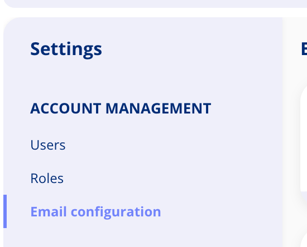
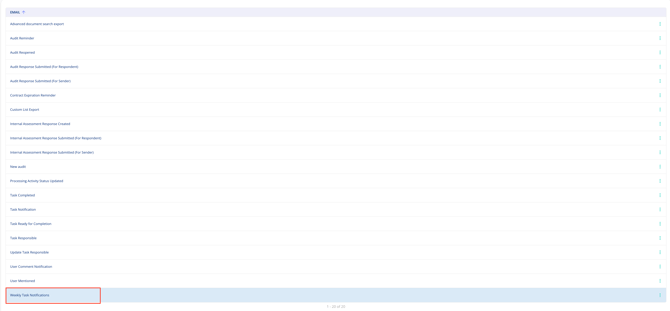
Select Weekly Task Notification from the list of emails.
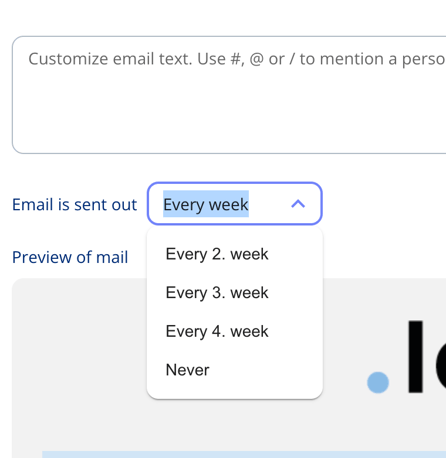
Under Send frequency, choose your preferred frequency from the available options, then click Save.
The Weekly Task Notification email will now be sent at your chosen frequency. The change takes effect from the next scheduled send.
