
The flow ensures you meet GDPR requirements, including your Article 30 record.
The 8 Documentation Steps
- General information – Name, tags, and purpose
- Data subjects and security – Who is affected, and how they’re protected
- Organisational details – Owner, company, business area
- Personal data categories – What types of data are used
- Legal basis and retention – Why you’re allowed to process and how long
- Linked systems (assets) – Tools or software used
- Data sharing – Vendors, recipients, controllers
- Policies and references – Linked documents or audits
Navigation and Flexibility
You can jump between steps freely. Incomplete steps are highlighted so you know what still needs attention. Document what you know and return later to complete.
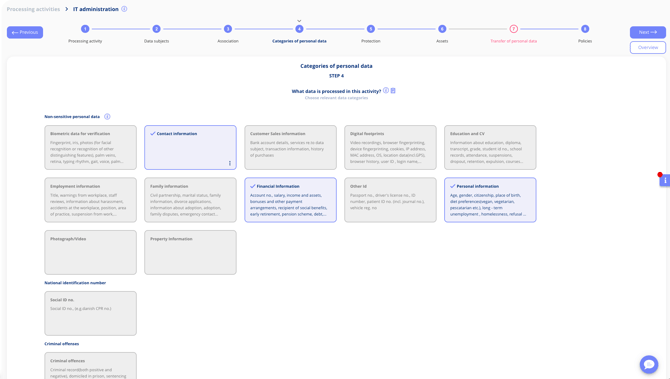
Complete steps in any order — progress is saved as you go
Personal Data Types
Personal data is registered as categories — contact details, health information and so on. If you need to be more precise, personal data types let you name the individual data points inside a category: "Name", "Email address", "Physical address".
The feature is optional. If categories at the higher level are enough for you, nothing needs to change.
- Go to Settings > Master Data > Data Categories and activate the function.
- Define the individual personal data types you need.
- Map each type to the personal data category it belongs under.
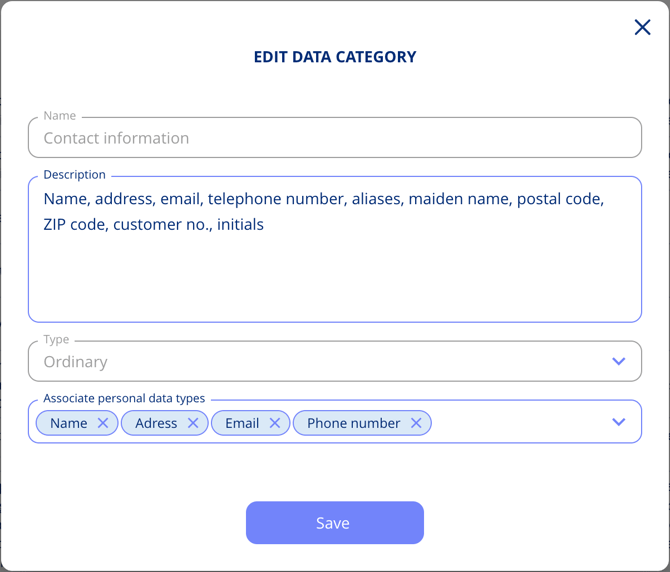
Because types are mapped onto the categories you already use, you build on your existing structure without losing anything.
Legal Basis on Several Data Categories at Once
When you add a legal basis to a personal data category on a disclosure in step 7, Transfer of personal data, you are asked whether the same legal basis and national law should apply to the remaining categories. Accepting saves repeating the same choice where it applies across many.
Who Can See Transfer Names
Whether a user can see and edit transfer names is controlled by a sub-permission on their role, set under Settings > Manage Roles. It applies to all transfer types on processing activities.
Related Articles