
A risk template is a reusable configuration that defines the scope and scenarios used in a risk assessment. Each template specifies:
Which type of risks you assess (e.g. GDPR, NIS2, internal)- What object you assess (processing activity or asset)
- The list of risk scenarios to evaluate
How do you create a risk template?
- Go to Risk.
- Choose a Compliance domain (e.g. GDPR, NIS2) and a Scope: Processing Activities or Assets.
- Select the Risk Template button.
- Add your risk scenarios.
- Save the template to make it available for assessments.
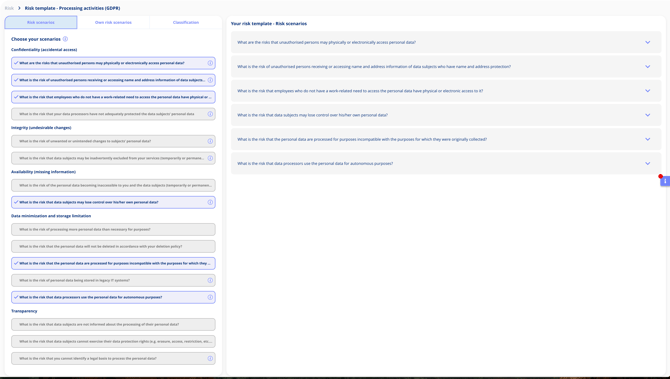
Each saved template defines which risks are assessed and how they are scoped, and becomes immediately available for use in assessments.
What are good practices for managing risk templates?
- Create separate templates for GDPR and NIS2.
- Use concise and actionable risk scenario names
- Keep templates versioned and up-to-date with your policies