
Every process is based on a template. The Standard process template is ready to use from the start. With the Templates and Custom Fields add-on you can also create your own, for example a NIS2 or an ISO 27001 process template, just as you can for contracts, assets and legal entities.
Where to find process templates
Go to Settings > Process templates. The list shows each template's name, description and status, and the standard template is marked with a check mark in the Standard process template column.
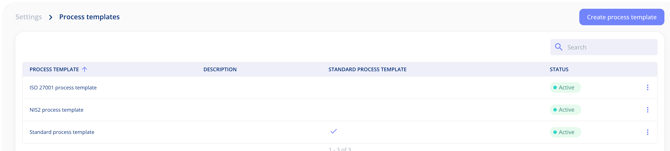
Create your own template
- Select Create process template.
- Give the template a name and a description that tells people when to use it.
- Add the fields your process needs.
Required fields
In each template you decide which fields are required. You can also make a field required at creation, so it has to be filled in before the process can be created at all.
Manage the steps
A template also decides which steps a process includes, and in what order. Under Manage steps you can:
- drag the steps into the order that suits you
- edit or delete a step
- add new steps (in your own templates)
Process and Access are always included and cannot be removed.
Important notes
- Your own templates require the Templates and Custom Fields add-on.
- A template can include a calculated field with a formula. See Add a calculated field to a contract template.